Home  /  Platform  /  Automation

Platform · Automation

The work that happens while you sleep.

A visual workflow builder with triggers, conditions, branches, waits and actions across every part of the platform — pages, forms, purchases, courses, calendar and inbox. Because it is one system, there is nothing to integrate.

Included from the $97 Grow plan · unlimited workflows

How it works

Something happens. Something else happens because of it.

01 · Trigger

Anything in the platform can start a workflow

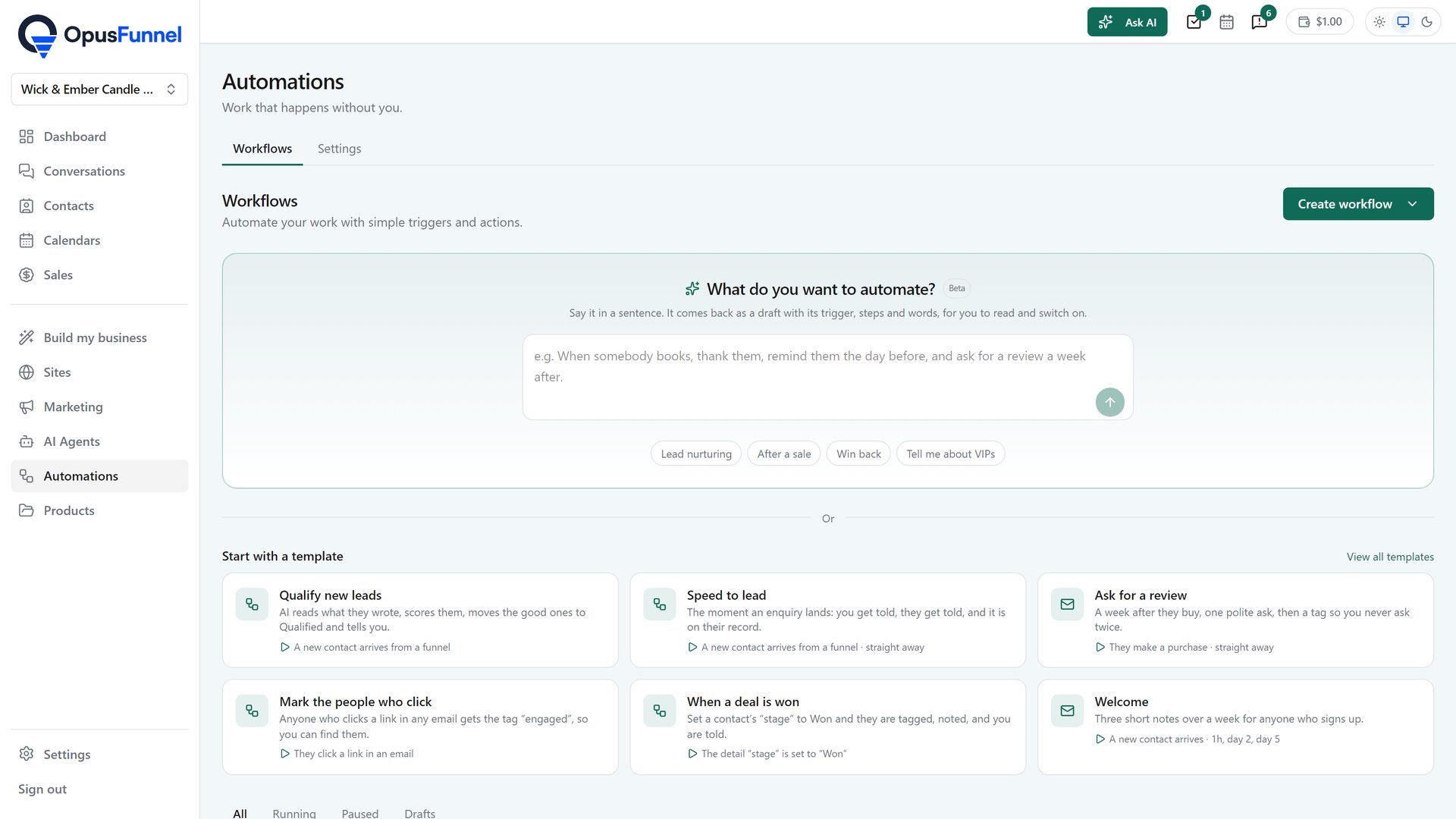
A form submitted, a purchase completed, a course module finished, an appointment booked or missed, a tag added, a link clicked, a page visited, a message received, a subscription cancelled. Every one of these is a trigger, because every one of them happens inside the same system.
  • Form, survey and quiz submissions
  • Purchases, refunds and failed payments
  • Course enrolment and module completion
  • Appointments booked, rescheduled or missed
  • Tags added or removed, links clicked, pages visited
  • Inbound messages on any channel
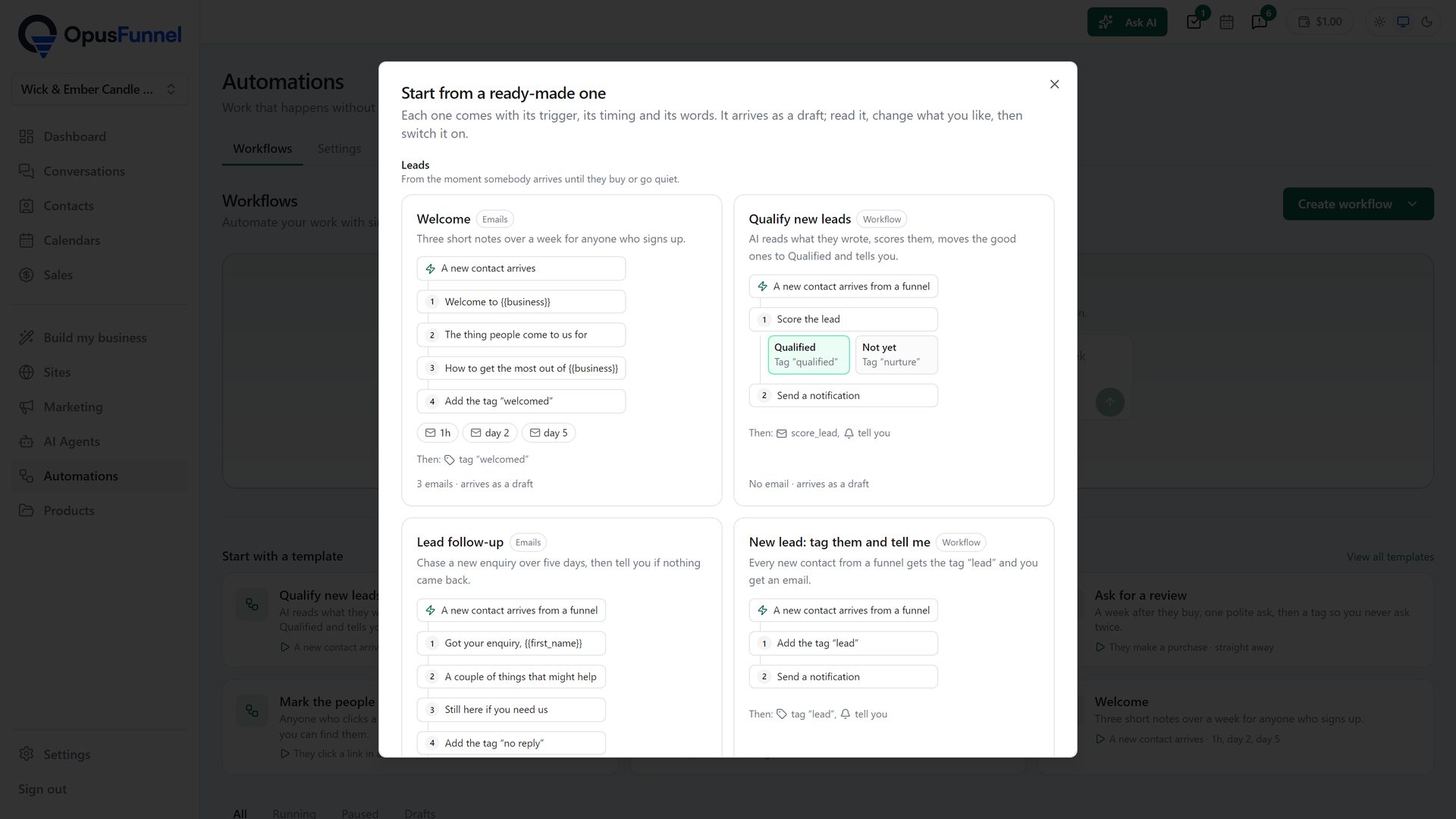
Describe the automation in plain English, or start from a template
Describe the automation in plain English, or start from a templateenlarge

02 · Branch

Conditions, branches and waits on a visual canvas

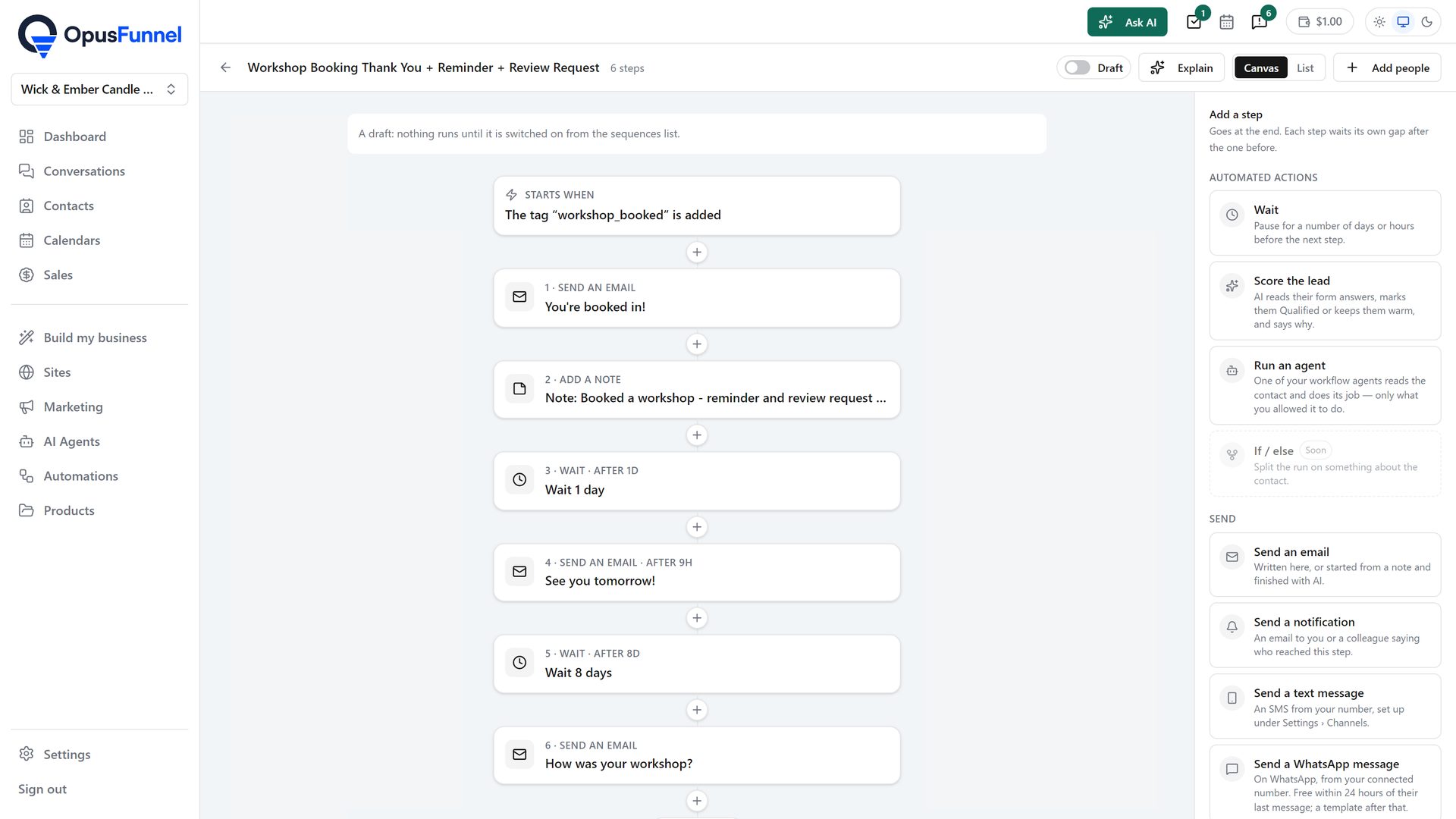
Drag the logic out on a canvas rather than describing it in a form. If they bought, do this; if they didn't, wait three days and do that. Split by any field, any tag, any behaviour. Wait for a fixed period, until a specific time of day, or until a condition becomes true.
  • Visual drag-and-drop workflow canvas
  • If/else branching on any field or behaviour
  • Wait steps — fixed delay, specific time, or until a condition
  • Goals that pull contacts out when they convert
  • Split-test different automation paths
  • Unlimited workflows and unlimited steps
A simple builder for linear journeys, an advanced one for branching
A simple builder for linear journeys, an advanced one for branchingenlarge

03 · Act

Then do the thing — anywhere in the platform

Send the email, add the tag, update the field, grant or revoke course access, move the deal down the pipeline, create the invoice, assign the task, notify your team, or fire a webhook to something outside. Actions reach into every module because there is only one system to reach into.
  • Send emails and internal notifications
  • Add or remove tags and update custom fields
  • Grant, revoke or extend course and community access
  • Move opportunities through a pipeline
  • Create invoices, contracts and tasks
  • Webhooks and API calls out to other tools
Filter trigger performance to see which automations actually fire
Filter trigger performance to see which automations actually fireenlarge

Everything included

Everything in automation

Automation is on the $97 Grow plan and above, with unlimited workflows throughout.

  • Visual workflow builder GROW
  • Unlimited workflows GROW
  • Unlimited steps per workflow GROW
  • Workflow templates GROW
  • Workflow folders and organisation GROW
  • Form and survey submission triggers GROW
  • Quiz outcome triggers GROW
  • Purchase and refund triggers GROW
  • Failed-payment triggers GROW
  • Subscription cancellation triggers GROW
  • Course enrolment and completion triggers GROW
  • Appointment booked, rescheduled and no-show triggers GROW
  • Tag added and removed triggers GROW
  • Trigger-link click triggers GROW
  • Page-visit triggers GROW
  • Inbound message triggers GROW
  • Pipeline stage-change triggers GROW
  • Date and birthday triggers GROW
  • If/else conditional branching GROW
  • Multi-branch splits GROW
  • Wait steps and delays GROW
  • Wait until a condition is met GROW
  • Business-hours awareness GROW
  • Goals and exit conditions GROW
  • A/B split testing inside workflows GROW
  • Send email action GROW
  • Add and remove tag actions GROW
  • Update custom field actions GROW
  • Grant and revoke course access GROW
  • Grant and revoke community access GROW
  • Move pipeline stage GROW
  • Create invoice and contract actions GROW
  • Assign task and notify team GROW
  • Internal notification actions GROW
  • Abandoned-cart recovery GROW
  • Appointment reminder and no-show sequences GROW
  • Workflow execution history and logs GROW
  • Webhooks out SCALE
  • Inbound webhooks and API triggers SCALE
  • Custom code steps SCALE
  • Private integrations SCALE
No badge = every plan, from $79 SELL = $29 and up GROW = $97 and up SCALE = $197 and up

The maths

What automation normally costs to bolt on

Zapier Professional$49/mo
ActiveCampaign automations$70/mo
Abandoned-cart app$19/mo
Same job, on OpusFunnelIncluded at $97

The subscription is the smaller cost. The larger one is that a Zap only knows what the two apps at each end agree to tell it — course progress and purchase history usually aren't in that handshake.

Questions

Common questions

What can actually trigger a workflow?

Anything that happens in the platform: forms, purchases, refunds, failed payments, course enrolment and completion, appointments booked or missed, tags, link clicks, page visits, inbound messages and pipeline changes. That breadth is a consequence of everything living in one system.

Do I need Zapier as well?

Usually not, for anything that stays inside the platform. If you need to reach an outside tool, webhooks and API access are on the $197 Scale plan, and Zapier still works alongside for the long tail.

Is there a limit on how many automations run?

Workflows are unlimited. Very high execution volumes may fall into a metered tier from our platform partner, and if your account ever approaches that we will tell you before it costs anything rather than after.

Can I see why something did or didn't fire?

Yes. Every workflow keeps an execution history per contact, showing which steps ran, which branch was taken and where a contact currently sits.

Can automation grant and remove course access?

Yes — grant on purchase, revoke on refund or failed payment, extend on renewal. This is one of the clearest wins from having courses and payments in the same system.

Also in the platform

Set it up once. It runs from then on.

Unlimited workflows across every part of the platform — from $97 a month.

14 days free · cancel anytime · 0% transaction fees
